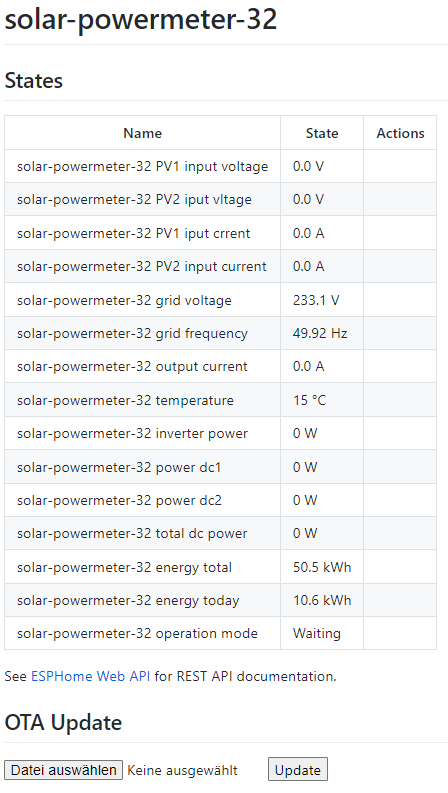
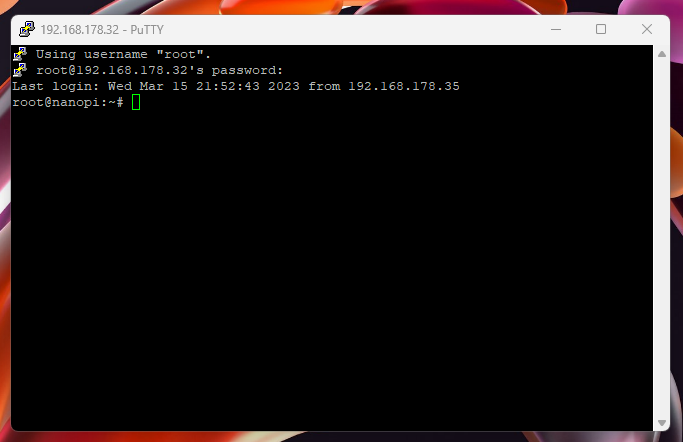
Das Teil würde ich gerne passend flashen, so dass die Daten nicht in der Cloud, sondern lokal hier in meinem Netz landen. Man muss ja das Rad nicht immer zweimal erfinden...
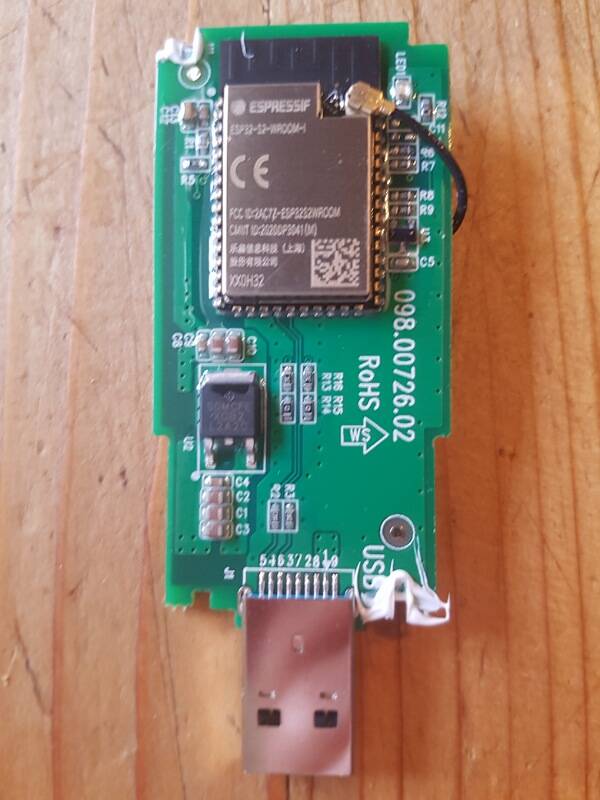
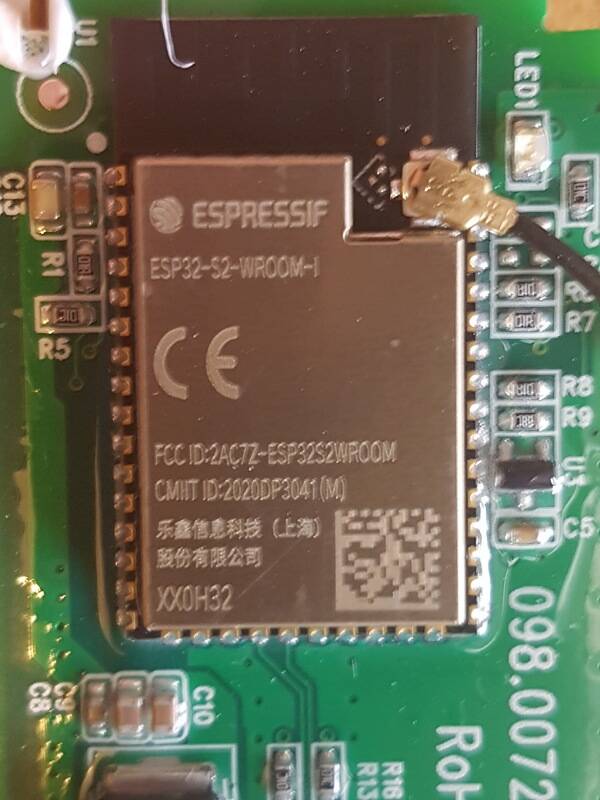
Leider wird kein serial-port verfügbar gemacht, wenn ich den Stick an mein Laptop anstecke. Insofern habe ich erstmal keinen Zugriff auf die firmware, kann da auch nichts draufschreiben.
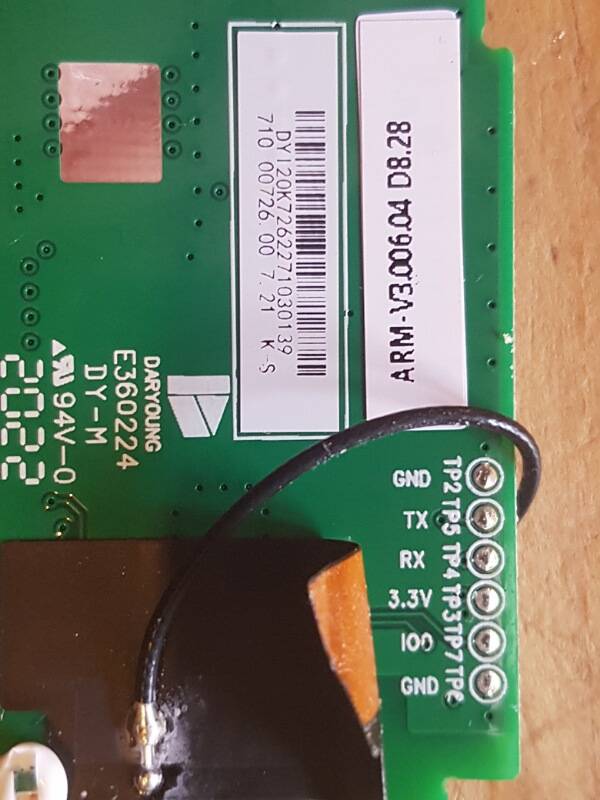
Auf der Rückseite, versteckt unter der erweiterten WIFI-Antenne, gibt es ein paar Pins:
Nur wird das Ergebnis nicht dem entsprechen was du erwartest. Du bekommst da keinen schön formatierten Quellcode raus. Wenn du das vor hast musst du dich gut in C / C++ und Assembler auskennen um aus dem Binary auf den Quellcode schliessen zu können.
Von esprssif gibt es ein Python-Script mit dem du das Binary bzw. den Flash auslesen kannst, dass kannst du dann in Assembler konvertieren.
Um das Problem mal einzugrenzen hätte ich folgende Vorschläge:
Bitte poste mal deine komplette yaml.
Kannst du mal das Log vom ESPHome posten?
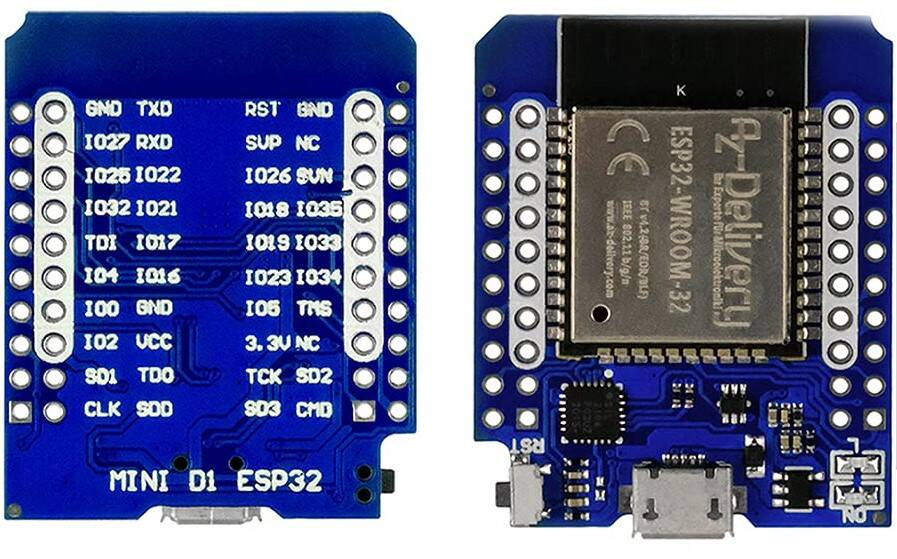
Verwendest du eine ESP8266 oder einen ESP32?
Verkabelung prüfen (hast du wahrscheinlich schon 100x gemacht) und am Besten durch messen. GRD hab ich auch nicht angeschlossen. Kannst du aber mal probieren.
Hast du noch einen weiteren ESP mit dem du mal testen kannst? Mach mal sind die Teile einfach kaputt.
Gibt es eine Möglichkeit mit der du den Modbus-Port vom SOLAX testen kannst?
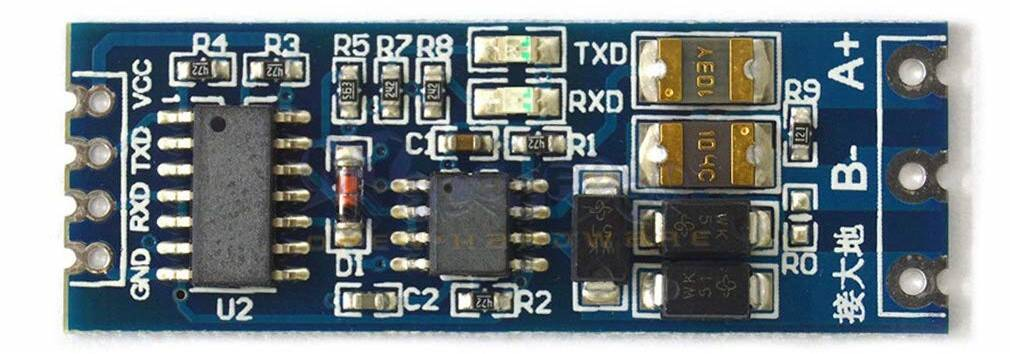
Hast du noch eine weiter RS485 Adapter-Platine die du probieren kannst?
@profantus Danke! Dann stelle ich das Pocket-Wifi Projekt erst mal zurück... ? Eingrenzenderweise.
- zur Hardware:verfügbar sind zwei verschiedene breakout-boards, und zwei verschiedene ESPs. ESP8266 und ESP32. Die Hardware habe ich auf Seite1 näher angegeben. Habe es zuerst mit dem ESP8266 versucht, seit gestern dann und aktuell mit dem ESP32 D1 mini.
[V][json:036]: Attempting to allocate 512 bytes for JSON serialization[V][json:056]: Size after shrink 120 bytes
[0;38m[VV][scheduler:207]: Running interval 'update' with interval=1000 last_execution=41815 (now=42815)[0m
[VV][scheduler:207]: Running interval 'update' with interval=1000 last_execution=41815 (now=42815)
[0;38m[VV][solax_modbus:235]: TX -> AA.55.01.00.00.0A.11.02.00.01.1D (11)[0m
[VV][solax_modbus:235]: TX -> AA.55.01.00.00.0A.11.02.00.01.1D (11)
[0;38m[VV][uart.arduino_esp32:151]: Flushing...[0m
[VV][uart.arduino_esp32:151]: Flushing...[V][json:036]: Attempting to allocate 512 bytes for JSON serialization[V][json:056]: Size after shrink 168 bytes[V][json:036]: Attempting to allocate 512 bytes for JSON serialization[V][json:056]: Size after shrink 168 bytes[V][json:036]: Attempting to allocate 512 bytes for JSON serialization[V][json:056]: Size after shrink 160 bytes[D][uart_debug:114]: >>> AA:55:01:00:00:0A:11:02:00:01:1D[V][json:036]: Attempting to allocate 512 bytes for JSON serialization[V][json:056]: Size after shrink 160 bytes[V][json:036]: Attempting to allocate 512 bytes for JSON serialization[V][json:056]: Size after shrink 160 bytes
[0;38m[VV][scheduler:207]: Running interval '' with interval=10000 last_execution=33008 (now=43012)[0m
[VV][scheduler:207]: Running interval '' with interval=10000 last_execution=33008 (now=43012)[V][json:036]: Attempting to allocate 512 bytes for JSON serialization[V][json:056]: Size after shrink 160 bytes[V][json:036]: Attempting to allocate 512 bytes for JSON serialization[V][json:056]: Size after shrink 156 bytes[V][json:036]: Attempting to allocate 512 bytes for JSON serialization[V][json:056]: Size after shrink 156 bytes[V][json:036]: Attempting to allocate 512 bytes for JSON serialization[V][json:056]: Size after shrink 160 bytes[V][json:036]: Attempting to allocate 512 bytes for JSON serialization[V][json:056]: Size after shrink 152 bytes[V][json:036]: Attempting to allocate 512 bytes for JSON serialization[V][json:056]: Size after shrink 176 bytes[V][json:036]: Attempting to allocate 512 bytes for JSON serialization[V][json:056]: Size after shrink 180 bytes[V][json:036]: Attempting to allocate 512 bytes for JSON serialization[V][json:056]: Size after shrink 156 bytes[V][json:056]: Size after shrink 156 bytes[V][json:036]: Attempting to allocate 512 bytes for JSON serialization[V][json:056]: Size after shrink 156 bytes[V][json:036]: Attempting to allocate 512 bytes for JSON serialization[V][json:056]: Size after shrink 176 bytes[V][json:036]: Attempting to allocate 512 bytes for JSON serialization[V][json:056]: Size after shrink 172 bytes
[0;38m[VV][scheduler:207]: Running interval 'update' with interval=1000 last_execution=42815 (now=43816)[0m
[VV][scheduler:207]: Running interval 'update' with interval=1000 last_execution=42815 (now=43816)
[0;38m[VV][solax_modbus:235]: TX -> AA.55.01.00.00.0A.11.02.00.01.1D (11)[0m
[VV][solax_modbus:235]: TX -> AA.55.01.00.00.0A.11.02.00.01.1D (11)
[0;38m[VV][uart.arduino_esp32:151]: Flushing...[0m
[VV][uart.arduino_esp32:151]: Flushing...[D][uart_debug:114]: >>> AA:55:01:00:00:0A:11:02:00:01:1D
[0;38m[VV][scheduler:207]: Running interval 'update' with interval=1000 last_execution=43815 (now=44817)[0m
[VV][scheduler:207]: Running interval 'update' with interval=1000 last_execution=43815 (now=44817)
[0;38m[VV][solax_modbus:235]: TX -> AA.55.01.00.00.0A.11.02.00.01.1D (11)[0m
[VV][solax_modbus:235]: TX -> AA.55.01.00.00.0A.11.02.00.01.1D (11)
[0;38m[VV][uart.arduino_esp32:151]: Flushing...[0m
[VV][uart.arduino_esp32:151]: Flushing...[D][uart_debug:114]: >>> AA:55:01:00:00:0A:11:02:00:01:1D
[0;38m[VV][scheduler:207]: Running interval 'update' with interval=1000 last_execution=44815 (now=45822)[0m
[VV][scheduler:207]: Running interval 'update' with interval=1000 last_execution=44815 (now=45822)
[0;38m[VV][solax_modbus:235]: TX -> AA.55.01.00.00.0A.11.02.00.01.1D (11)[0m
[VV][solax_modbus:235]: TX -> AA.55.01.00.00.0A.11.02.00.01.1D (11)
[0;38m[VV][uart.arduino_esp32:151]: Flushing...[0m
[VV][uart.arduino_esp32:151]: Flushing...[D][uart_debug:114]: >>> AA:55:01:00:00:0A:11:02:00:01:1D
[0;38m[VV][scheduler:207]: Running interval '' with interval=60000 last_execution=4294953786 (now=46491)[0m
[VV][scheduler:207]: Running interval '' with interval=60000 last_execution=4294953786 (now=46491)
[0;38m[VV][scheduler:207]: Running interval 'update' with interval=1000 last_execution=45815 (now=46815)[0m
[VV][scheduler:207]: Running interval 'update' with interval=1000 last_execution=45815 (now=46815)
[0;38m[VV][solax_modbus:235]: TX -> AA.55.01.00.00.0A.11.02.00.01.1D (11)[0m
[VV][solax_modbus:235]: TX -> AA.55.01.00.00.0A.11.02.00.01.1D (11)
[0;38m[VV][uart.arduino_esp32:151]: Flushing...[0m
[VV][uart.arduino_esp32:151]: Flushing...[D][uart_debug:114]: >>> AA:55:01:00:00:0A:11:02:00:01:1D
[0;38m[VV][scheduler:207]: Running interval 'update' with interval=1000 last_execution=46815 (now=47818)[0m
[VV][scheduler:207]: Running interval 'update' with interval=1000 last_execution=46815 (now=47818)[D][sensor:127]: 'solar-powermeter-32 mode': Sending state -1.00000 with 0 decimals of accuracy[V][json:036]: Attempting to allocate 512 bytes for JSON serialization[V][json:056]: Size after shrink 84 bytes[V][text_sensor:016]: 'solar-powermeter-32 mode name': Received new state Offline[D][text_sensor:067]: 'solar-powermeter-32 mode name': Sending state 'Offline'[D][text_sensor:067]: 'solar-powermeter-32 mode name': Sending state 'Offline'[V][json:036]: Attempting to allocate 512 bytes for JSON serialization[V][json:056]: Size after shrink 100 bytes[D][sensor:127]: 'solar-powermeter-32 temperature': Sending state nan °C with 0 decimals of accuracy[V][json:036]: Attempting to allocate 512 bytes for JSON serialization[V][json:036]: Attempting to allocate 512 bytes for JSON serialization[V][json:056]: Size after shrink 92 bytes[D][sensor:127]: 'solar-powermeter-32 dc1 voltage': Sending state 0.00000 V with 1 decimals of accuracy[V][json:036]: Attempting to allocate 512 bytes for JSON serialization[V][json:056]: Size after shrink 96 bytes[D][sensor:127]: 'solar-powermeter-32 dc2 voltage': Sending state 0.00000 V with 1 decimals of accuracy[V][json:036]: Attempting to allocate 512 bytes for JSON serialization[V][json:056]: Size after shrink 96 bytes[D][sensor:127]: 'solar-powermeter-32 dc1 current': Sending state 0.00000 A with 1 decimals of accuracy[V][json:036]: Attempting to allocate 512 bytes for JSON serialization[V][json:056]: Size after shrink 96 bytes[D][sensor:127]: 'solar-powermeter-32 dc2 current': Sending state 0.00000 A with 1 decimals of accuracy[V][json:036]: Attempting to allocate 512 bytes for JSON serialization[V][json:056]: Size after shrink 96 bytes[D][sensor:127]: 'solar-powermeter-32 ac current': Sending state 0.00000 A with 1 decimals of accuracy[V][json:036]: Attempting to allocate 512 bytes for JSON serialization[V][json:056]: Size after shrink 92 bytes[D][sensor:127]: 'solar-powermeter-32 ac voltage': Sending state nan V with 1 decimals of accuracy[V][json:036]: Attempting to allocate 512 bytes for JSON serialization[V][json:056]: Size after shrink 92 bytes[D][sensor:127]: 'solar-powermeter-32 ac frequency': Sending state nan Hz with 2 decimals of accuracy[V][json:036]: Attempting to allocate 512 bytes for JSON serialization[V][json:056]: Size after shrink 92 bytes[D][sensor:127]: 'solar-powermeter-32 ac power': Sending state 0.00000 W with 0 decimals of accuracy[V][json:036]: Attempting to allocate 512 bytes for JSON serialization[V][json:056]: Size after shrink 88 bytes[V][json:056]: Size after shrink 88 bytes[D][solax_x1_mini:298]: The device is or was offline. Broadcasting discovery for address configuration...[D][solax_x1_mini:298]: The device is or was offline. Broadcasting discovery for address configuration...
[0;38m[VV][solax_modbus:235]: TX -> AA.55.01.00.00.00.10.00.00.01.10 (11)[0m
[VV][solax_modbus:235]: TX -> AA.55.01.00.00.00.10.00.00.01.10 (11)
[0;38m[VV][solax_modbus:235]: TX -> AA.55.01.00.00.00.10.00.00.01.10 (11)[0m
[VV][solax_modbus:235]: TX -> AA.55.01.00.00.00.10.00.00.01.10 (11)
[0;38m[VV][uart.arduino_esp32:151]: Flushing...[0m
[VV][uart.arduino_esp32:151]: Flushing...[V][component:200]: Component solax_x1_mini took a long time for an operation (0.32 s).[V][component:201]: Components should block for at most 20-30ms.[D][uart_debug:114]: >>> AA:55:01:00:00:00:10:00:00:01:10
[0;38m[VV][scheduler:207]: Running interval 'update' with interval=1000 last_execution=47815 (now=48816)[0m
[VV][scheduler:207]: Running interval 'update' with interval=1000 last_execution=47815 (now=48816)
[0;38m[VV][solax_modbus:235]: TX -> AA.55.01.00.00.0A.11.02.00.01.1D (11)[0m
[VV][solax_modbus:235]: TX -> AA.55.01.00.00.0A.11.02.00.01.1D (11)
[0;38m[VV][uart.arduino_esp32:151]: Flushing...[0m
[VV][uart.arduino_esp32:151]: Flushing...[D][uart_debug:114]: >>> AA:55:01:00:00:0A:11:02:00:01:1D
[0;38m[VV][scheduler:207]: Running interval 'update' with interval=1000 last_execution=48815 (now=49819)[0m
[VV][scheduler:207]: Running interval 'update' with interval=1000 last_execution=48815 (now=49819)
[0;38m[VV][solax_modbus:235]: TX -> AA.55.01.00.00.0A.11.02.00.01.1D (11)[0m
[VV][solax_modbus:235]: TX -> AA.55.01.00.00.0A.11.02.00.01.1D (11)
[0;38m[VV][uart.arduino_esp32:151]: Flushing...[0m
[VV][uart.arduino_esp32:151]: Flushing...[D][uart_debug:114]: >>> AA:55:01:00:00:0A:11:02:00:01:1D
[0;38m[VV][scheduler:207]: Running interval 'update' with interval=1000 last_execution=49815 (now=50823)[0m
[VV][scheduler:207]: Running interval 'update' with interval=1000 last_execution=49815 (now=50823)
[0;38m[VV][solax_modbus:235]: TX -> AA.55.01.00.00.0A.11.02.00.01.1D (11)[0m
[VV][solax_modbus:235]: TX -> AA.55.01.00.00.0A.11.02.00.01.1D (11)
[0;38m[VV][uart.arduino_esp32:151]: Flushing...[0m
[VV][uart.arduino_esp32:151]: Flushing...
[0;38m[VV][uart.arduino_esp32:151]: Flushing...[0m
[VV][uart.arduino_esp32:151]: Flushing...[D][uart_debug:114]: >>> AA:55:01:00:00:0A:11:02:00:01:1D
[0;38m[VV][scheduler:207]: Running interval 'update' with interval=1000 last_execution=50815 (now=51816)[0m
[VV][scheduler:207]: Running interval 'update' with interval=1000 last_execution=50815 (now=51816)
[0;38m[VV][solax_modbus:235]: TX -> AA.55.01.00.00.0A.11.02.00.01.1D (11)[0m
[VV][solax_modbus:235]: TX -> AA.55.01.00.00.0A.11.02.00.01.1D (11)
[0;38m[VV][uart.arduino_esp32:151]: Flushing...[0m
[VV][uart.arduino_esp32:151]: Flushing...
[0;38m[VV][uart.arduino_esp32:151]: Flushing...[0m
[VV][uart.arduino_esp32:151]: Flushing...[D][uart_debug:114]: >>> AA:55:01:00:00:0A:11:02:00:01:1D
[0;38m[VV][scheduler:207]: Running interval 'update' with interval=1000 last_execution=51815 (now=52819)[0m
[VV][scheduler:207]: Running interval 'update' with interval=1000 last_execution=51815 (now=52819)
[0;38m[VV][solax_modbus:235]: TX -> AA.55.01.00.00.0A.11.02.00.01.1D (11)[0m
[VV][solax_modbus:235]: TX -> AA.55.01.00.00.0A.11.02.00.01.1D (11)
[0;38m[VV][uart.arduino_esp32:151]: Flushing...[0m
[VV][uart.arduino_esp32:151]: Flushing...[D][uart_debug:114]: >>> AA:55:01:00:00:0A:11:02:00:01:1D
[0;38m[VV][scheduler:207]: Running interval '' with interval=10000 last_execution=43008 (now=53009)[0m
[VV][scheduler:207]: Running interval '' with interval=10000 last_execution=43008 (now=53009)
[0;38m[VV][scheduler:207]: Running interval 'update' with interval=1000 last_execution=52815 (now=53818)[0m
[VV][scheduler:207]: Running interval 'update' with interval=1000 last_execution=52815 (now=53818)[D][sensor:127]: 'solar-powermeter-32 mode': Sending state -1.00000 with 0 decimals of accuracy[V][json:036]: Attempting to allocate 512 bytes for JSON serialization[V][json:056]: Size after shrink 84 bytes[V][text_sensor:016]: 'solar-powermeter-32 mode name': Received new state Offline[V][text_sensor:016]: 'solar-powermeter-32 mode name': Received new state Offline[D][text_sensor:067]: 'solar-powermeter-32 mode name': Sending state 'Offline'[V][json:036]: Attempting to allocate 512 bytes for JSON serialization[V][json:056]: Size after shrink 100 bytes[D][sensor:127]: 'solar-powermeter-32 temperature': Sending state nan °C with 0 decimals of accuracy[V][json:036]: Attempting to allocate 512 bytes for JSON serialization[V][json:056]: Size after shrink 92 bytes[D][sensor:127]: 'solar-powermeter-32 dc1 voltage': Sending state 0.00000 V with 1 decimals of accuracy[V][json:036]: Attempting to allocate 512 bytes for JSON serialization[V][json:056]: Size after shrink 96 bytes[D][sensor:127]: 'solar-powermeter-32 dc2 voltage': Sending state 0.00000 V with 1 decimals of accuracy[D][sensor:127]: 'solar-powermeter-32 dc2 voltage': Sending state 0.00000 V with 1 decimals of accuracy[V][json:036]: Attempting to allocate 512 bytes for JSON serialization[V][json:056]: Size after shrink 96 bytes[D][sensor:127]: 'solar-powermeter-32 dc1 current': Sending state 0.00000 A with 1 decimals of accuracy[V][json:036]: Attempting to allocate 512 bytes for JSON serialization[V][json:056]: Size after shrink 96 bytes[D][sensor:127]: 'solar-powermeter-32 dc2 current': Sending state 0.00000 A with 1 decimals of accuracy[V][json:036]: Attempting to allocate 512 bytes for JSON serialization[V][json:056]: Size after shrink 96 bytes[D][sensor:127]: 'solar-powermeter-32 ac current': Sending state 0.00000 A with 1 decimals of accuracy[V][json:036]: Attempting to allocate 512 bytes for JSON serialization[V][json:056]: Size after shrink 92 bytes[D][sensor:127]: 'solar-powermeter-32 ac voltage': Sending state nan V with 1 decimals of accuracy[V][json:036]: Attempting to allocate 512 bytes for JSON serialization[V][json:056]: Size after shrink 92 bytes[D][sensor:127]: 'solar-powermeter-32 ac frequency': Sending state nan Hz with 2 decimals of accuracy[V][json:036]: Attempting to allocate 512 bytes for JSON serialization[V][json:056]: Size after shrink 92 bytes[V][json:056]: Size after shrink 92 bytes[D][sensor:127]: 'solar-powermeter-32 ac power': Sending state 0.00000 W with 0 decimals of accuracy[V][json:036]: Attempting to allocate 512 bytes for JSON serialization[V][json:056]: Size after shrink 88 bytes[D][solax_x1_mini:298]: The device is or was offline. Broadcasting discovery for address configuration...
[0;38m[VV][solax_modbus:235]: TX -> AA.55.01.00.00.00.10.00.00.01.10 (11)[0m
[VV][solax_modbus:235]: TX -> AA.55.01.00.00.00.10.00.00.01.10 (11)
[0;38m[VV][uart.arduino_esp32:151]: Flushing...[0m
[VV][uart.arduino_esp32:151]: Flushing...
[0;38m[VV][uart.arduino_esp32:151]: Flushing...[0m
[VV][uart.arduino_esp32:151]: Flushing...[V][component:200]: Component solax_x1_mini took a long time for an operation (0.33 s).[V][component:201]: Components should block for at most 20-30ms.[D][uart_debug:114]: >>> AA:55:01:00:00:00:10:00:00:01:10
Bei RS485 ist Senden und Empfangen die selbe Datenleitung und er hat ne am ESP Seriennummer gefangen.
Er hat kein Problem mit der ESP oder RS485 Hardware.
Steht alles auf der ersten Seite.
@und-mehr Probleme mit dem ESP schließe ich auch aus. Ich tippe mal auf ein Problem in der SOLAX Konfiguration. Man sieht ja das das Discover Telegram nicht beantwortet wird. Heißt da hört keiner auf dem Bus oder der Versteht das Telegramm nicht. Da das alles ja schon mal bei andern geklappt hat glaube ich muss es am SOLAX liegen.
ich habe die Diskussion quer gelesen. Bitte verzeiht mir, wenn ich Dinge wiederhole, die schon lange klar sind. Ich habe das Gefühl, dass die folgende Kleinigkeit im Puzzle fehlt:
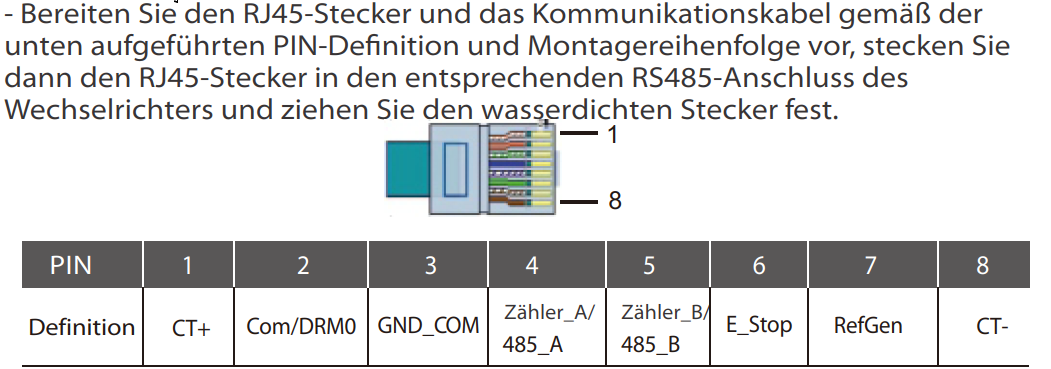
Der X1 Mini antwortet sofort auf eine Anfrage, wenn man ihm eine Frage (via RS485 + ESPHome) stellt. Der X1 Boost spricht ModbusRTU. Diese Funktion muss in den Einstellungen (nach Eingabe eines Management-Passwort (6868)) aktiviert werden. Danach kann man mit dem Inverter Modbus-konform sprechen. Eine Beispielkonfiguration die ohne große Anpassungen funktionieren sollte findest du hier:
Ansonsten wurden hier bereits alle wichtigen Fragen gestellt (welche der beiden LEDs blinkt periodisch, teilt man sich die GPIOs mit dem Logger und sollte man den Logger deshalb stumm schalten etc.).
Wenn du die Daten nach Venus OS bringen möchtest musst du das Python Script von @undmehr auf dem Cerbo GX zum laufen bringen und in ESPHome die Daten via MQTT versenden.
wenn alles läuft loglevel wieder auf info, debug frisst CPU zeit.
api rauswerfen oder timeout für das reboot auf 0 setzen (Native API Component — ESPHome)
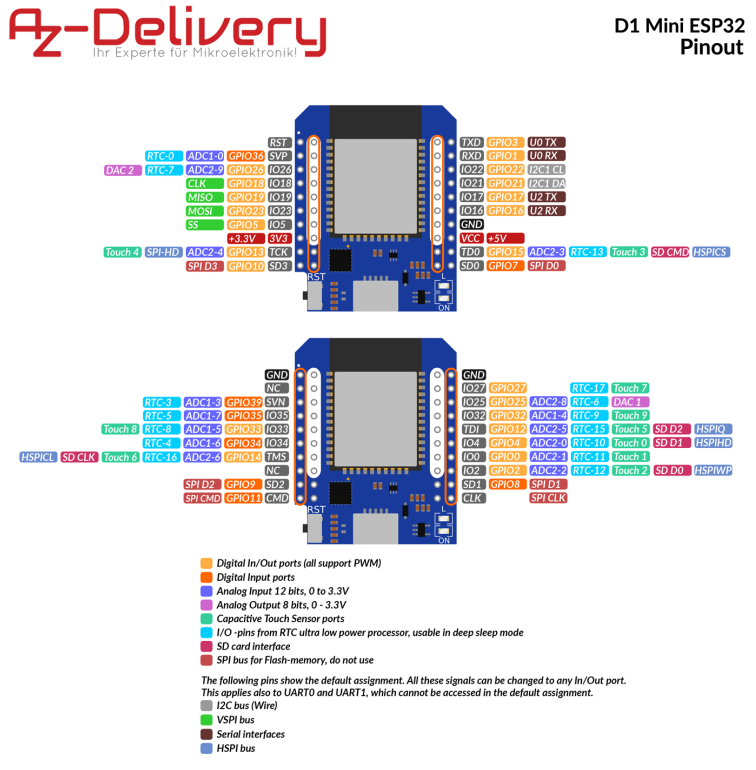
 Ich habe das Gefühl, dass die folgende Kleinigkeit im Puzzle fehlt: