Vielleicht ist es aber gut, dort im Forum quer zu lesen…zumindest verspüre ich jetzt keine Lust mehr sofort die Firmware bei mir auf die 19.13 upzudaten 
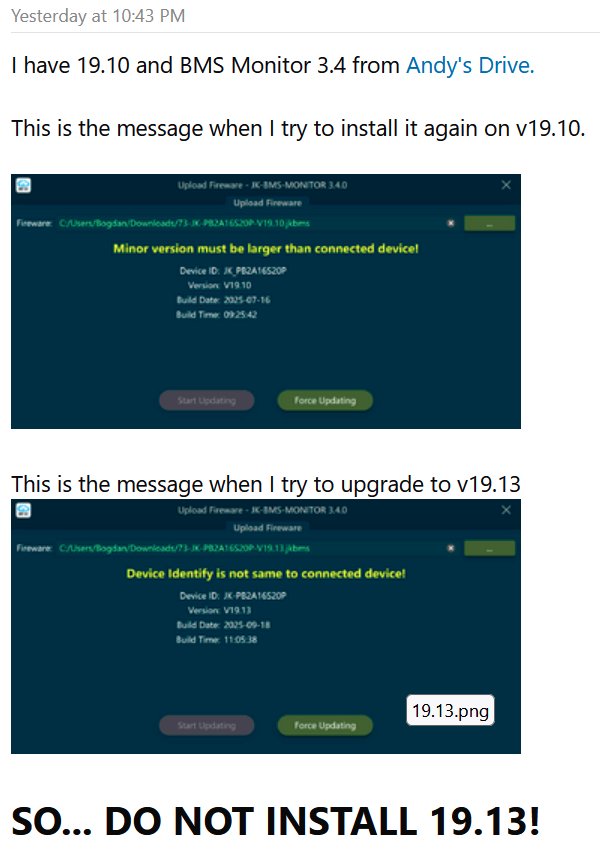
Danke. Hatte in dem Archive einen ChangeLog vermutet. Ohne den installiere ich es sowieso nicht. Lottospielen geht woanders besser 
1 „Gefällt mir“
Bei mir war das gleiche Bild 
hallo no is good v19.13 ok !!!
Was möchte man uns sagen? 
Da diese Firmware die UART2 und ich es schwierig finden, die BMS 1 und 2 in Dips -Slave zu konfigurieren, da ich ein ESP -Atom 32 habe und Yambms ESP32 Master und 2 BMS -Slave und unmöglich 2 BMS -Sklave verwenden kann !!! toll !
Ich habe diese Nachricht auf der englischen Website geschrieben
1 „Gefällt mir“
Habe die Change Log gefunden.
V19.10 Upgrade logs
1.After the capacity is set, the cycle capacity will no longer be cleared.
2.Added the function of zeroing the current, eliminating the zero drift current.
3.Add the function of low-temperature protection during discharge.
4.Increase the Re-Bulk SOC parameter, optimize the float charging logic, and remove the RFV timer. For detailed information, please refer to the video posted by Andy on YouTube.
5.Optimize the communication protocol of the energy storage display
-@2025-07-16 by JKBMS(JIKONG)
V19.11 Upgrade logs
1.The activation button can be used to adapt to both the self-locking button and the reset button simultaneously.
2.In the parallel mode, the current request margin has increased from 5% to 20%.
3.The overcurrent protection is increased by 2% to meet the requirements of some aging cabinets.
-@2025-07-29 by JKBMS(JIKONG)
V19.13 Upgrade logs
1.Add some reserved communication protocols..
2.Upgrade the LCD protocol and support 3.2-inch segmented display.
3.Upgrade the Bluetooth communication protocol to V2.0.
4.Update the Growatt CAN protocol.
5.Add support for LIN bus.
-@2025-09-18 by JKBMS(JIKONG)
Werde aber trotzdem Warten mit dem Update.
Edit Geht auch nicht zu Laden. Wie in Posts vorher schonmal erwähnt worden ist.
2 „Gefällt mir“
Hi everyone,
I’m finishing a new installation and have run into a communication problem that I can’t solve. I’d appreciate some advice from anyone who has successfully connected a JK BMS to Victron.
System setup:
• Inverter/charger: Victron MultiPlus II 48/15000/200-100 (firmware v558)
• ESS managed by Ekrano GX (new Cerbo GX model)
• PV:
– 2 × Fronius inverters (AC-coupled)
– 1 × SmartSolar MPPT 250/85 (DC-coupled)
• Batteries:
– 4 × LiFePO₄ JK-PB2A16S20P v19 (314 Ah each) — currently testing with only one connected
– Interconnected via Lynx Power In + Lynx Shunt + Lynx Distributor
– 250 A fuses per battery, 400 A main fuse
Goal:
I need the Ekrano GX to detect the JK batteries over CAN-bus, without using any external battery monitor.
Current setup:
• Custom RJ45–RJ45 cable from VE.Can (Ekrano GX) to CAN port (JK BMS)
• BMS protocol: 004 – Victron_CANbus_BMS_protocol_20170717
• Baud rate: 500 kbps
• Tried both pin orders (CAN-H / CAN-L swapped)
• 120 Ω terminators at both ends
• RS485 communication between batteries works fine
• GX still shows “No BMS detected”
• Victron keeps SOC fixed at 100 %, while the BMS reports ~25 %
• Ekrano GX does not recognize the CAN device
I’ve been testing for several days and can’t get the GX to detect the JK BMS.
If anyone has managed to make this setup work or has the correct CAN pinout/protocol combination, I’d really appreciate your help 
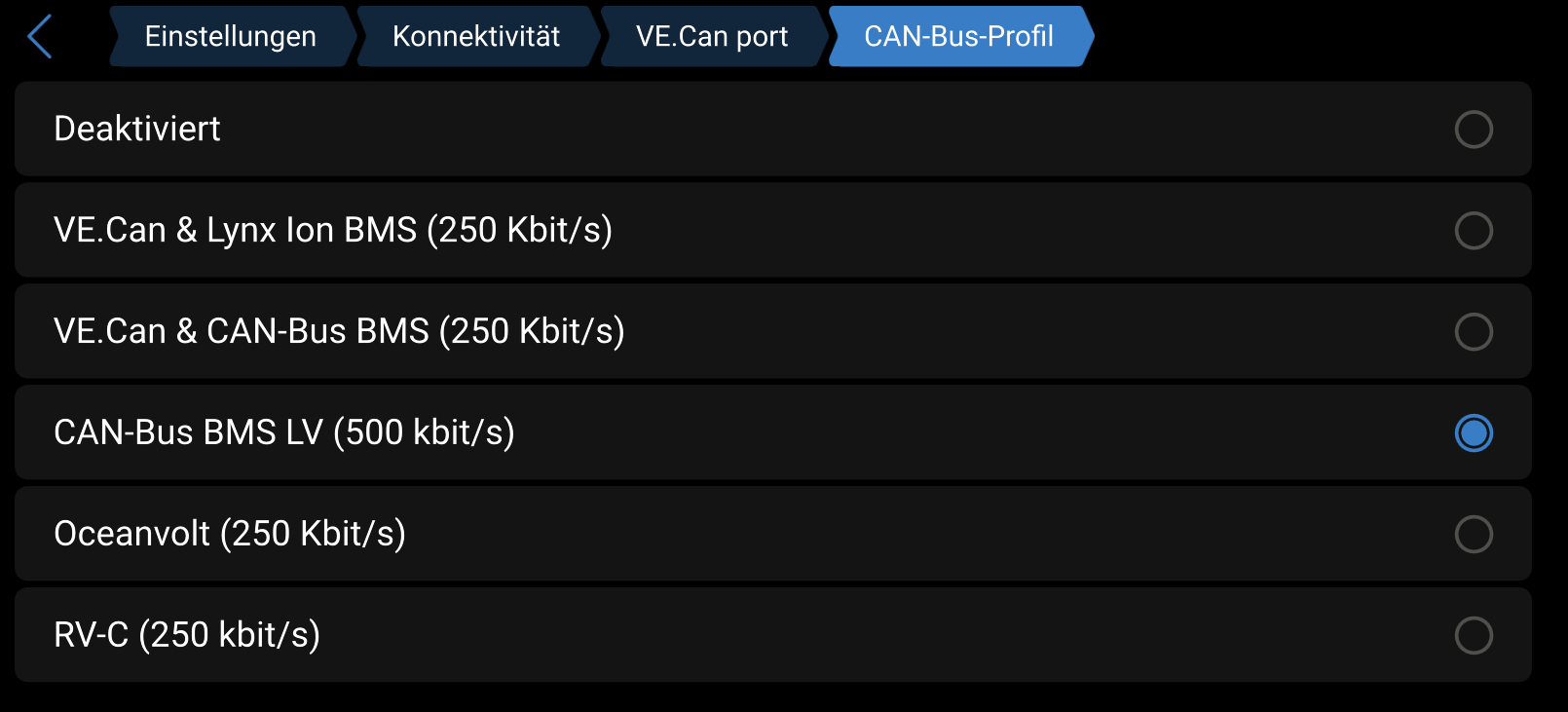
What is your CAN configuration in the Ekrano?
Should be like this:
No need for this.
Would avoid these way of testing because of danger to destroy sth.
Pin 5 is CAN-L -> Brown wire
PIn 4 is CAN-H -> Brown/White wire
Here is pretty complete guide for this: https://onvolt.pl/wp-content/uploads/2024/06/Instrukcja-JK-HES-EN-v1.2.pdf
And maybe there is a need of restart for new configuration to work of the Ekrano or even the BMS when you change protocol settings (maybe not but helps sometimes).
Thanks for the warning and the guide!
I’ve done quite a few tests already — hopefully I haven’t damaged anything.
I’ve been told that a VE.Can to CAN-bus Type B cable is required, and I’ve just got one.
I’ll test it this afternoon and see how it goes.
Eureka — it’s finally working with the Type B cable! 
The Ekrano GX immediately detected the JK-BMS and started reading all values correctly.
Thanks a lot to everyone here for the help and guidance — really appreciate it!
2 „Gefällt mir“
Hallo,
ich habe vier AkkuPacks, alle mit dem neuen V19 JK BMS. Softwarestand 19.10.
Bei zwei der Packs wird das UART2 Protokoll zur Kommunikation der Packs untereinander nicht korrekt ausgewählt. Ist eine automatische Auswahl entsprechend der Device ID.
Amy Wan hat ihre Kontakte zu JK genutzt und nach Abfrage der BMS Seriennummern die Rückmeldung bekommen, dass ein Firmware Update auf 19.13 erforderlich ist. Dateien wurden direkt mitgeschickt.
Wenn ich es hier bzw. auch im anderen Forum richtig lese, klappt das Update gar nicht bzw. macht mehr Probleme, als es löst?
Hat jetzt schon jemand die 19.13 aufgespielt?
1 „Gefällt mir“
Nein, habe ich nicht.
Aktuell habe ich keinen Änderungsbedarf und warte die weitere Entwicklung ab.
1 „Gefällt mir“
Nein, nutze 19.10 und bisher ohne Bugs für mich.
Habe nur in einem der letzten Videos (glaube es war das MB56 Yixiyang Box Video) gesehen, dass Andy die "Verfügbarkeit" von 19.13 kommentiert hat und ggf. ein Video veröffentlicht.
Interpretiere ich es aber richtig, dann geht es ihm langsam auch auf den Keks, das Software-Downloadportal von JKong zu spielen....
5 „Gefällt mir“
Ich werde mit dem Firmware Update auch noch warten.
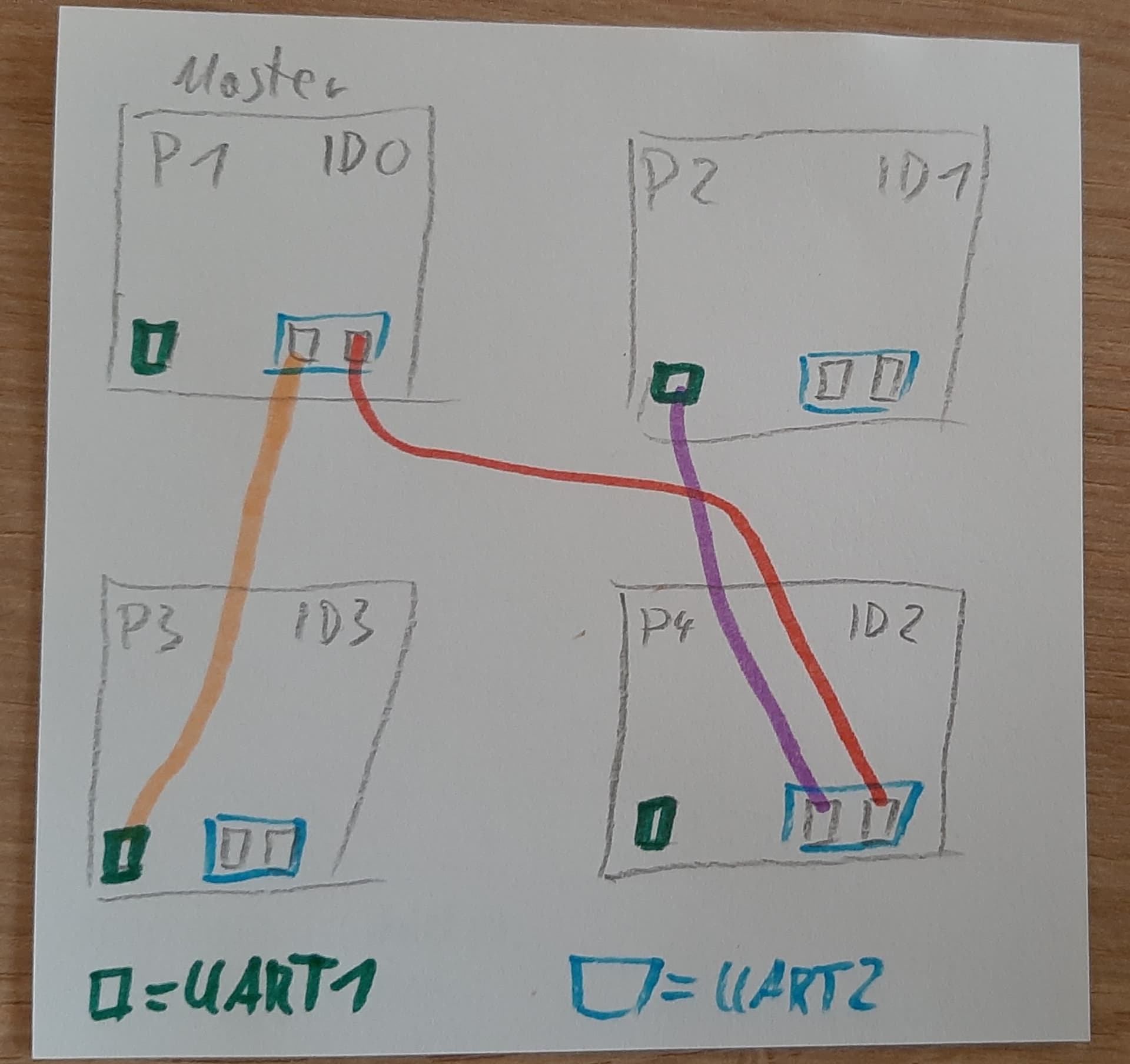
Habe für mich eine funktionierende Lösung gefunden. Bei den beiden AkkuPacks, welche sich das falsche Protokoll für UART2 ziehen, habe ich einfach den UART1 Port verwendet und dort das Protokoll auf “001 JK BMS RS485 Modbus V0.1” gestellt.
Von JK nicht so vorgesehen, aber funktioniert für mich gut.
Hallo,
ich habe die V19.13 direkt vom JK Support bekommen.
Lässt sich aber nicht aufspielen. Habe ein Video zurück geschickt zum Support aber noch keine Antwort bekommen.
Also warten auf V19.14😉
3 „Gefällt mir“
Hi zusammen - für alle die es interessiert:
ESP32-P4 - Unterstützung in ESPHome wird immer besser (ich hab auch selbst paar Kleinigkeiten fertig gemacht).
Das bedeutet: Das Waveshare 10.1 Display Kit mit dem ESP32-P4 im RaspberryPi-Format ist nahezu vollständig supported (fehlen nur noch unwichtige Kleinigkeiten, wie der 2. (langsamere, nur FS) USB-OTG-Port (der erste HS2.0 funzt^^)
Da ich nun auch den Support für CH934-Treiber-basierte USB-Serials und SD- und USB-Storage-Support funktional umgesetzt habe, hier mal eine Liste der unterstützten Funktionen eines JK-BMS-Displays/Controllers basierend auf diesem Set:
Wifi 6/Ethernet/BT-BLE (ja auch BT-Verbindung zum JK!)
Config load/save to SD/USB
FW-Upgrade from SD/USB (in testing stage)
So viele RS485/CAN wie man braucht, durch Unterstützung von CH348Q basierten achtfach-USB-Serials → 2 an einem ESP32 möglich = bis zu 16 verschiedene Kanäle
Huawei Charger (R4850 etc), Energymeter etc können also direkt verbunden werden. Extra-Platine zum separaten Umschalten der Uarts zwischen normalem TTL-Modus/CAN/RS485 und Voltage-Umschalten (3.3V/5V) und vollständigen separaten Isolieren aller dieser USB-Kanäle ist in der Mache (zusammen mit dem 10€ USB-Serial werden das dann etwa 35€ für ein 8fach-Adaptergerät mit den genannten Funktionen)
SolarInverter-Unterstützung über die entsprechenden 2.4GHz Funkmodule und/oder UART-Protokolle ist ebenfalls in der Mache
PowerMeter - Support (Victron und andere) schon vorhanden
MQTT/HA-API Support
- weitere BMS auch bald unterstützt
Damit werden die Trucki-Adapterplatinen (sry Trucki) ziemlich überflüssig, weil die Huaweis auf sichere Weise mit größerem Feature-Support und günstiger gleich mit unterstützt werden
Mal sehen wie Andy von der OffGridGarage guckt, wenn ich ein YT-Video online stelle, auf dem ich auf meinem selbstgebauten JK-BMS-Display ein YT-Video von ihm an hab 
2 „Gefällt mir“
Hallo,
das klingt schon klasse.
Wobei ich meine “Huawei-Trucki” natürlich erst einmal nicht überflüssig sehe … denn noch habe ich ja nichts zum Umstellen …
1 „Gefällt mir“
hast du denn schon einen passenden P4 ? dann könnte ich dir auch schon die aktuelle Dev-Version von ESPHome dafür geben macht täglich Fortschritte - heute hab ich zB den Webdav-Server fertig gemacht - nun kann man auch auf alle medien (sd/usb) per netzwerk zugreifen und alle typischen Dateioperationen vornehmen.
Nächster Step ist der allgemeine Config-Store auf selbigen Medien, FW laden und flashen und Datenlogger