Gibt’s inzwischen schon mehr Erfahrungen? Erfolg bei Ansteuerung über Modbus?
Nächste Woche sollten wir Zeit haben weiter zu machen.
(Laut Händler ist Modbus freigeschaltet)
Werde das ausprobieren:
Nachtrag:
Waren leider die Woche nicht dazu gekommen.
Bin aber neugierig und hoffe das es bald klappt
1 „Gefällt mir“
Hallo, gibt es schon etwas Neues zu dem Thema?
Ich bin auch sehr interessiert an der HIT Serie - aber nur, wenn ich cloudfreie Kontrolle über das Gerät habe und ich es vernünftig in Homeassistant einbinden kann.
Welcher Händler hat dich denn da unterstützt?
Ansonsten:
Was gibt’s für Erfahrungen? Irgendwelche Dinge, die im Betrieb negativ aufstoßen?
1 „Gefällt mir“
Der Händler ist enercab.at
Laut Georg arbeiten sie auch an einer HomeAssistant-Integration. Aber ohne Gewähr.
Hallo zusammen, wie habt ihr das Batteriekabel angeschlossen? Laut Installationsvideo auf der Hoymiles Youtubeseite - feinstdrähtiges Kabel direkt geklemmt? Das kann doch nicht die Norm sein…
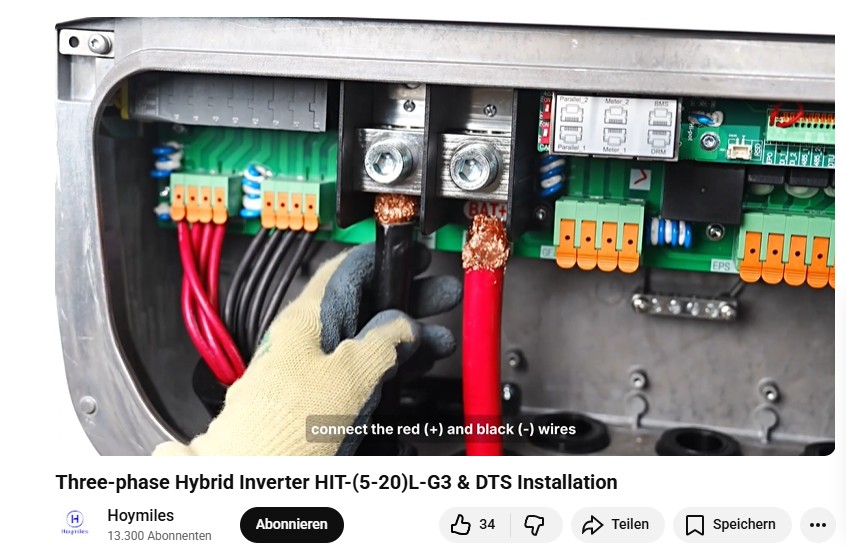
Kommt auf die Klemme an. Wenn das nur ne Schraube ist die sich in die Litzen bohrt gehört da ne Adernendhülse drauf. Wenn das ein Klemmmechanismus ist wo quasi ne Platte die Adern runterdrückt dann passt das so.
Ist eine (sehr dicke!) Schraube.
Die Anleitung zeigt eine "nicht genormte" Lösung.
Modbus weiter, der Weg:
Vorbereitungen für ModBus Test mit Adapter:
Kabelbelegung

485A meißt "A+", noch verifizieren durch nachmessen. Ja, stimmt.
485B an B+.
Erde kommt an GND.
Ich habe den Anschluss Parallel1 am HIT-20L-G3 für das Modbus Signal benutzt.
Modbus in Home Assistant mit dem Adapter:
Configuration.yaml muss editiert werden.
("File Editor" bei "Add-ons" vorher installieren)
Nach "schnellen Neuladen" (oder komplett "home assistant neustarten"? Dauert lange) ist neue Entität da und unter Geräten der Modbus Eintrag zu sehen.
(Neustart bei "Entwicklerwerkzeuge" (muß vorher aktiviert werden? Vorher dort "Konfiguration prüfen" wählen und Fehler in der Configuration.yaml beheben)
richtige einstellungen finden, versuch
Um die richtigen Einstellungen für die Configuration.yaml zu finden, habe ich die Offizielle modbus Registerdokumentation in Verbindung mit der Frage nach den richtigen Einstellungn für "Home Assistant Configuration.yaml" "modbus RTU hoymiles hybrid wechselrichter HIT-20L" und dem "Waveshare usb-to-Rs485" Stick, versuchsweise einer Ki zum lösen gegeben. Bei mir bspw. Mistral Ai.
Beispiel Ergebnis (mit falscher Baudrate und falschen USB Anschluss, 115200 und /dev/ttyACM0 wären richtig) :
(Verifiziert, Adresse durch XXX von mir ersetzt)
modbus:
  - name: hoymiles_hit20l
    type: serial
    method: rtu
    port: /dev/ttyUSB0
    baudrate: 9600
#   baudrate: 115200
    bytesize: 8
    parity: N
    stopbits: 1
#   timeout: 5
    sensors:
      - name: "PV Total Power"
        slave: 1
        address: XXX
        input_type: input
        data_type: uint16
        scale: 1
        unit_of_measurement: "W"
Man kann aber auch aus anderen Beispielen und der Dokumentation sich die Einstellungen für die Register zusammenkopieren und die eigenen einfügen
Datenübertragung hat mit nächster Einstellung bei mir funktioniert !
Suddenly: Success!
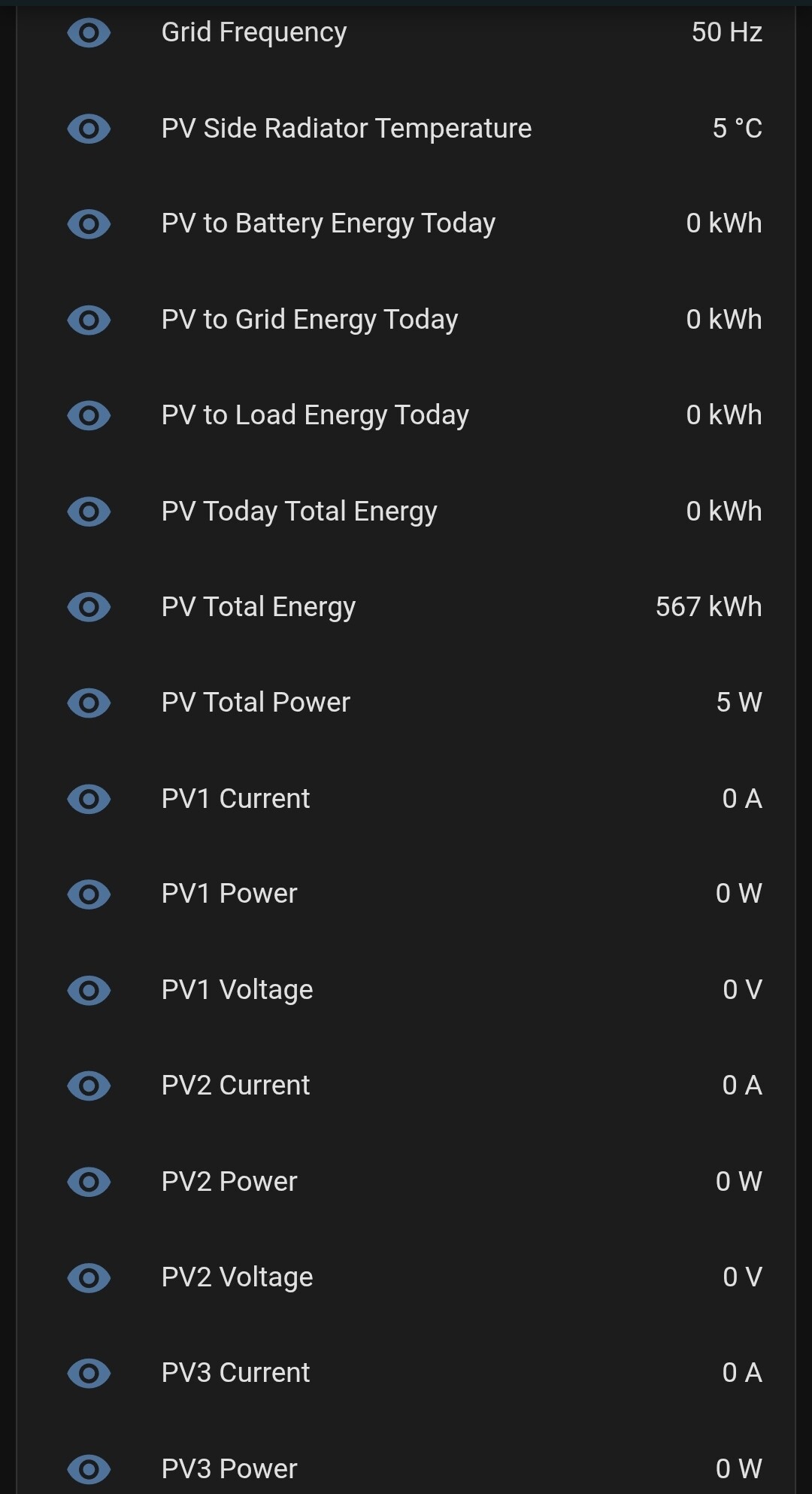
Funktionierende Einstellung, Adresse von mir durch XX ersetzt:
modbus:
  - name: hoymiles_hit20l
    type: serial
    method: rtu
    port: /dev/ttyACM0
#  port: /dev/ttyUSB0
#  baudrate: 9600
    baudrate: 115200
    bytesize: 8
    parity: N
    stopbits: 1
#   timeout: 5

    sensors:
      - name: "PV1 Voltage"
        slave: 1
        address: XX
        input_type: input
        data_type: uint16
        scale: 0.1
        unit_of_measurement: "V"


      - name: "PV Total Power"
        slave: 1
        address: XX
        input_type: input
        data_type: uint16
        scale: 1
        unit_of_measurement: "W"
port: /dev/ttyACM0
baudrate: 115200
führten bei mir zum Erfolg.

2 „Gefällt mir“

"PV1 Voltage" verändert seine Werte und funktioniert.
"PV Total Power" hängt bei 5W und verändert sich nicht.
Ich habe deswegen im Beispiel Code auch "PV1 Voltage" als funktionierenden Wert eingefügt.
Es gibt schon viele Werte her, die interessant sind.
Mal gucken warum einige sich nicht verändern.
Viel Erfolg beim ausprobieren!
Nachtrag:
Bitte schreibt was ihr machen mußtet, damit es bei euch läuft oder ob ihr andere Geräte zum RS485 Signal konvertieren erfolgreich benutzt habt. (z.B. RS485 zu LAN oder ähnliches)
Nachtrag2:
Zum ausprobieren wo welche Werte sein könnten, falls die Adressen fehlen:
(Am Beispiel 1 bis 60. Man sieht wo sich was bewegt)
Zusammenfassung
```

  - name: "- PV Total Power 1"
    slave: 1
    address: 1
    input_type: input
    data_type: uint16
    scale: 100
    unit_of_measurement: "W"

  - name: "- PV Total Power 2"
    slave: 1
    address: 2
    input_type: input
    data_type: uint16
    scale: 100
    unit_of_measurement: "W"
  - name: "- PV Total Power 3"
    slave: 1
    address: 3
    input_type: input
    data_type: uint16
    scale: 100
    unit_of_measurement: "W"
  - name: "- PV Total Power 4"
    slave: 1
    address: 4
    input_type: input
    data_type: uint16
    scale: 100
    unit_of_measurement: "W"
  - name: "- PV Total Power 5"
    slave: 1
    address: 5
    input_type: input
    data_type: uint16
    scale: 100
    unit_of_measurement: "W"
  - name: "- PV Total Power 6"
    slave: 1
    address: 6
    input_type: input
    data_type: uint16
    scale: 100
    unit_of_measurement: "W"
  - name: "- PV Total Power 7"
    slave: 1
    address: 7
    input_type: input
    data_type: uint16
    scale: 100
    unit_of_measurement: "W"
  - name: "- PV Total Power 8"
    slave: 1
    address: 8
    input_type: input
    data_type: uint16
    scale: 100
    unit_of_measurement: "W"
  - name: "- PV Total Power 9"
    slave: 1
    address: 9
    input_type: input
    data_type: uint16
    scale: 100
    unit_of_measurement: "W"
  - name: "- PV Total Power 10"
    slave: 1
    address: 10
    input_type: input
    data_type: uint16
    scale: 100
    unit_of_measurement: "W"
  - name: "- PV Total Power 11"
    slave: 1
    address: 11
    input_type: input
    data_type: uint16
    scale: 100
    unit_of_measurement: "W"
  - name: "- PV Total Power 12"
    slave: 1
    address: 12
    input_type: input
    data_type: uint16
    scale: 100
    unit_of_measurement: "W"
  - name: "- PV Total Power 13"
    slave: 1
    address: 13
    input_type: input
    data_type: uint16
    scale: 100
    unit_of_measurement: "W"
  - name: "- PV Total Power 14"
    slave: 1
    address: 14
    input_type: input
    data_type: uint16
    scale: 100
    unit_of_measurement: "W"
  - name: "- PV Total Power 15"
    slave: 1
    address: 15
    input_type: input
    data_type: uint16
    scale: 100
    unit_of_measurement: "W"
  - name: "- PV Total Power 16"
    slave: 1
    address: 16
    input_type: input
    data_type: uint16
    scale: 100
    unit_of_measurement: "W"
  - name: "- PV Total Power 17"
    slave: 1
    address: 17
    input_type: input
    data_type: uint16
    scale: 100
    unit_of_measurement: "W"
  - name: "- PV Total Power 18"
    slave: 1
    address: 18
    input_type: input
    data_type: uint16
    scale: 100
    unit_of_measurement: "W"
  - name: "- PV Total Power 19"
    slave: 1
    address: 19
    input_type: input
    data_type: uint16
    scale: 100
    unit_of_measurement: "W"
  - name: "- PV Total Power 20"
    slave: 1
    address: 20
    input_type: input
    data_type: uint16
    scale: 100
    unit_of_measurement: "W"
  - name: "- PV Total Power 21"
    slave: 1
    address: 21
    input_type: input
    data_type: uint16
    scale: 100
    unit_of_measurement: "W"
  - name: "- PV Total Power 22"
    slave: 1
    address: 22
    input_type: input
    data_type: uint16
    scale: 100
    unit_of_measurement: "W"
  - name: "- PV Total Power 23"
    slave: 1
    address: 23
    input_type: input
    data_type: uint16
    scale: 100
    unit_of_measurement: "W"
  - name: "- PV Total Power 24"
    slave: 1
    address: 24
    input_type: input
    data_type: uint16
    scale: 100
    unit_of_measurement: "W"
  - name: "- PV Total Power 25"
    slave: 1
    address: 25
    input_type: input
    data_type: uint16
    scale: 100
    unit_of_measurement: "W"
  - name: "- PV Total Power 26 500W?"
    slave: 1
    address: 26
    input_type: input
    data_type: uint16
    scale: 1
    unit_of_measurement: "W"
  - name: "- PV Total Power 27"
    slave: 1
    address: 27
    input_type: input
    data_type: uint16
    scale: 100
    unit_of_measurement: "W"
  - name: "- PV Total Power 28"
    slave: 1
    address: 28
    input_type: input
    data_type: uint16
    scale: 100
    unit_of_measurement: "W"
  - name: "- PV Total Power 29 111"
    slave: 1
    address: 29
    input_type: input
    data_type: uint16
    scale: 1
    unit_of_measurement: "W"
  - name: "- PV Total Power 30"
    slave: 1
    address: 30
    input_type: input
    data_type: uint16
    scale: 100
    unit_of_measurement: "W"
  - name: "- PV Total Power 31"
    slave: 1
    address: 31
    input_type: input
    data_type: uint16
    scale: 100
    unit_of_measurement: "W"
  - name: "- PV Total Power 32 222"
    slave: 1
    address: 32
    input_type: input
    data_type: uint16
    scale: 1
    unit_of_measurement: "W"
  - name: "- PV Total Power 33"
    slave: 1
    address: 33
    input_type: input
    data_type: uint16
    scale: 100
    unit_of_measurement: "W"
  - name: "- PV Total Power 34"
    slave: 1
    address: 34
    input_type: input
    data_type: uint16
    scale: 100
    unit_of_measurement: "W"
  - name: "- PV Total Power 35 333"
    slave: 1
    address: 35
    input_type: input
    data_type: uint16
    scale: 1
    unit_of_measurement: "W"
  - name: "- PV Total Power 36"
    slave: 1
    address: 36
    input_type: input
    data_type: uint16
    scale: 100
    unit_of_measurement: "W"
  - name: "- PV Total Power 37"
    slave: 1
    address: 37
    input_type: input
    data_type: uint16
    scale: 100
    unit_of_measurement: "W"
  - name: "- PV Total Power 38"
    slave: 1
    address: 38
    input_type: input
    data_type: uint16
    scale: 1
    unit_of_measurement: "W"
  - name: "- PV Total Power 39"
    slave: 1
    address: 39
    input_type: input
    data_type: uint16
    scale: 100
    unit_of_measurement: "W"
  - name: "- PV Total Power 40"
    slave: 1
    address: 40
    input_type: input
    data_type: uint16
    scale: 100
    unit_of_measurement: "W"
  - name: "- PV Total Power 41"
    slave: 1
    address: 41
    input_type: input
    data_type: uint16
    scale: 100
    unit_of_measurement: "W"
  - name: "- PV Total Power 42"
    slave: 1
    address: 42
    input_type: input
    data_type: uint16
    scale: 100
    unit_of_measurement: "W"
  - name: "- PV Total Power 43"
    slave: 1
    address: 43
    input_type: input
    data_type: uint16
    scale: 100
    unit_of_measurement: "W"
  - name: "- PV Total Power 44"
    slave: 1
    address: 44
    input_type: input
    data_type: uint16
    scale: 100
    unit_of_measurement: "W"
  - name: "- PV Total Power 45"
    slave: 1
    address: 45
    input_type: input
    data_type: uint16
    scale: 100
    unit_of_measurement: "W"
  - name: "- PV Total Power 46"
    slave: 1
    address: 46
    input_type: input
    data_type: uint16
    scale: 100
    unit_of_measurement: "W"
  - name: "- PV Total Power 47"
    slave: 1
    address: 47
    input_type: input
    data_type: uint16
    scale: 100
    unit_of_measurement: "W"
  - name: "- PV Total Power 48"
    slave: 1
    address: 48
    input_type: input
    data_type: uint16
    scale: 100
    unit_of_measurement: "W"
  - name: "- PV Total Power 49"
    slave: 1
    address: 49
    input_type: input
    data_type: uint16
    scale: 100
    unit_of_measurement: "W"
  - name: "- PV Total Power 50"
    slave: 1
    address: 50
    input_type: input
    data_type: uint16
    scale: 100
    unit_of_measurement: "W"
  - name: "- PV Total Power 51"
    slave: 1
    address: 51
    input_type: input
    data_type: uint16
    scale: 100
    unit_of_measurement: "W"
  - name: "- PV Total Power 52"
    slave: 100
    address: 52
    input_type: input
    data_type: uint16
    scale: 1
    unit_of_measurement: "W"
  - name: "- PV Total Power 53"
    slave: 1
    address: 53
    input_type: input
    data_type: uint16
    scale: 100
    unit_of_measurement: "W"
  - name: "- PV Total Power 54"
    slave: 1
    address: 54
    input_type: input
    data_type: uint16
    scale: 100
    unit_of_measurement: "W"
  - name: "- PV Total Power 55"
    slave: 1
    address: 55
    input_type: input
    data_type: uint16
    scale: 100
    unit_of_measurement: "W"
  - name: "- PV Total Power 56"
    slave: 1
    address: 56
    input_type: input
    data_type: uint16
    scale: 100
    unit_of_measurement: "W"
  - name: "- PV Total Power 57"
    slave: 1
    address: 57
    input_type: input
    data_type: uint16
    scale: 100
    unit_of_measurement: "W"
  - name: "- PV Total Power 58"
    slave: 1
    address: 58
    input_type: input
    data_type: uint16
    scale: 100
    unit_of_measurement: "W"
  - name: "- PV Total Power 59"
    slave: 1
    address: 59
    input_type: input
    data_type: uint16
    scale: 100
    unit_of_measurement: "W"
  - name: "- PV Total Power 60"
    slave: 1
    address: 60
    input_type: input
    data_type: uint16
    scale: 100
    unit_of_measurement: "W"
Tolle Zusammenfassung und Detektivarbeit 
Gefällt mir soweit! Jetzt, da du viele Werte schon geliefert bekommst, wird sicherlich mit der Zeit auch ersichtlich, ob der HIT auch immer brav tut, was er soll oder unsinniges Zeug im Kopf hat.
Lassen sich über Modbus auch Einstellungen vornehmen? Bspw Batterie, Ausgänge zum Steuern von Wallbox/Wärmepumpe? Sonstiges..?
Angeblich soll man auch steuern können.
(Auf eigenes Risiko, da man auch Unsinn einstellen kann.)
Nachtrag:
@eule01x
Es gibt als schreibbar gekennzeichnete Register für sehr vieles. EV Charger, Heat Pump, Akku Ladebedingungen(Netz), mehrere verschiedene Zeitprogramme, ..
Hier bei dem Gerät bleibt es erstmal nur beim Auslesen.
Und beim DTU gleichzeitig benutzen kam mal ein plausibler Wert durch 
Ja man kann auch einstellen. Allerdings ist das reverse engineering - wenn man das Register nicht hat/kennt - weitaus schwieriger. Weil man ja Werte setzen muss und dann ‚erraten‘ muss was diese bewirkt haben.
Wenn man bei den Configuration.yaml einträgen noch:
unique_id:
device_class: energy
state_class:
precision: 2
(Zwei Nachkommastellen )
Dazu gibt und benutzt, kann Home Assistant besser damit umgehen und man hat wohl dann richtige Entitäten.
Aber das geht alles Richtung Thema: Home Assistant
Kann man die Modbus-Registertabelle für dieses Gerät finden?
Ich habe vom Hoymiles Support die Antwort bekommen, dass die Registerverteilung für dieses Gerät einer Geheimhaltungsvereinbarung unterliegt.
Also ich finde diese seltsame Geheimnistuerei SEHR seltsam. Wozu implementiert man so ein Feature wenn man es dann nicht zugänglich macht. Genau sowas ist es doch, was die Produkte wesentlich interessanter für gewisse Zielgruppen macht.
Zugegeben 99% der Käufer wird es natürlich vollkommen egal sein 
1 „Gefällt mir“
einfach den Händler anschreiben würd ich sagen
1 „Gefällt mir“
Es geht wohl darum, dass man sein Gerät damit auch kaputt machen kann.
(Zu oft beschreiben, etc..)
Das weiß dann der Händler (das man zugriff da drauf hat), den das im Garantiefall interessieren wird.
Vom Händler sollte man die offizielle Dokumentation zu den Schnittstellen bekommen können.
Und damit bin ich als potentieller Käufer für dieses Gerät raus.
Ich kaufe keine zugemauertes System.